

After some research, it appears to be a general consensus in the community that the data type of relationship keys does not significantly impact visual performance in Power BI reports.
For example, some published benchmarks have shown little to no measurable difference between text and integer relationship columns in controlled models.
And in many models, that is true.
However, in real-world scenarios where multiple data sources are combined, relationships become increasingly complex. In some cases, this leads to long text fields or composite string keys being used to define relationships. In these situations, the performance characteristics can change significantly.
Testing on production pharmaceutical data in the workplace showed that models relying on long text-based relationship keys performed noticeably worse than those using small integer surrogate keys, especially as model complexity increased.
This article walks through a practical experiment comparing two Power BI models built on the same dataset: the Brazilian E-Commerce Public Dataset by Olist. The only difference between the models is how relationships are defined:
- one uses long text-based keys
- the other uses integer surrogate keys
The goal is to isolate the impact of key design in a realistic, high-complexity model.
Dataset
This dataset includes multiple related tables such as:
- Customers
- Orders
- Order Items
- Payments
- Products
- Sellers
- Reviews
This provides a realistic, multi-table model with both transactional and descriptive data, similar to what is often seen when combining data from multiple business systems.
Model A — Text-Based Keys
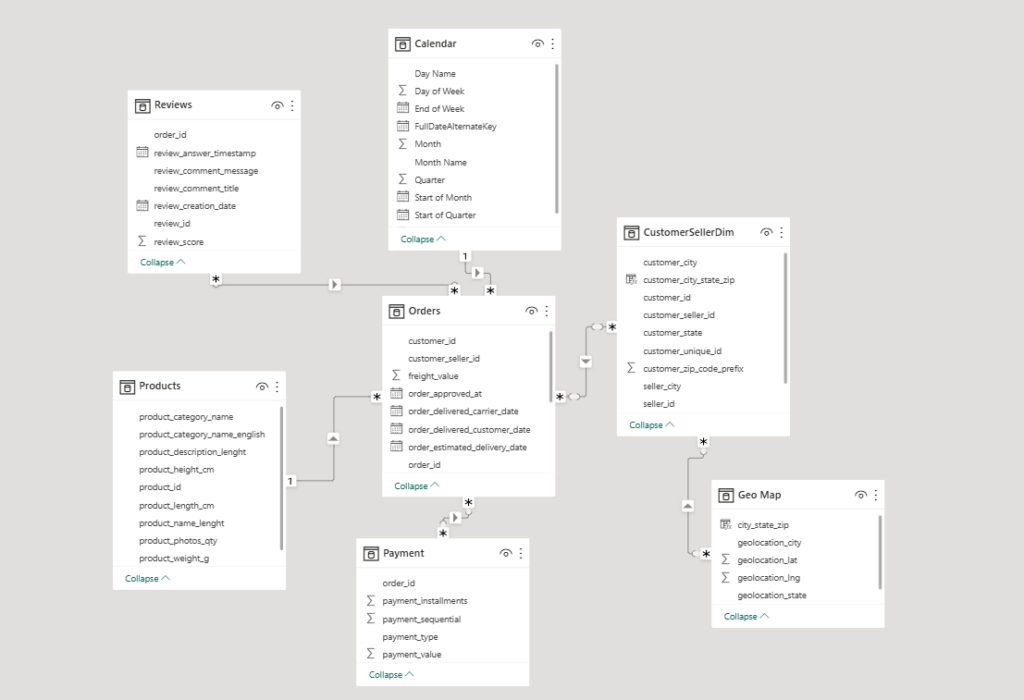
In the first model, relationships are defined using text columns. The model was created to reflect how this would typically be implemented in a real-world scenario.
In some cases, tables were combined and keys were created by concatenating multiple fields, for example:
customer_id & "|" & seller_id
This is done to reflect the level of complexity typically seen in production datasets. The keys are relatively long and have high cardinality.
Model B — Integer Surrogate Keys
In the second model, the same relationships are replaced with integer surrogate keys.
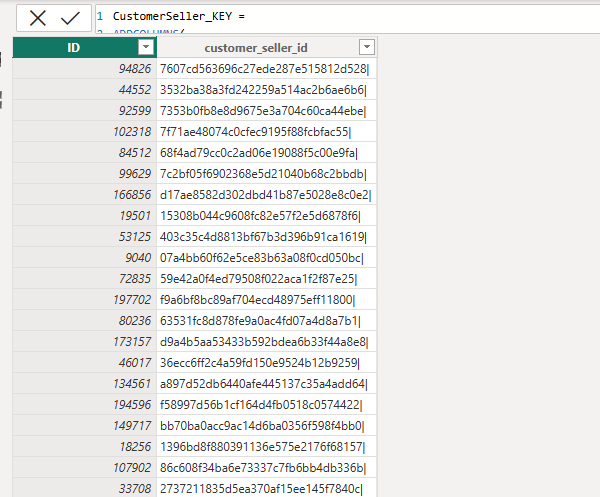
There are several ways in which these keys could be created and added to the model, some of which can have different impacts on memory usage and model size. In this scenario, DAX Tables were created and added to tables using lookup values. This was accomplished like so:
- DAX Table created with all unique keys
CustomerSeller_LookupKeys =
DISTINCT(CustomerSellerDim[customer_seller_id])- A second DAX Table created to assign integer keys from 1
CustomerSeller_KEY =
ADDCOLUMNS(
  CustomerSeller_LookupKeys,
  "ID",
  RANKX(ALL(CustomerSeller_LookupKeys[customer_seller_id]),
  CustomerSeller_LookupKeys[customer_seller_id],,ASC,Dense)
)
- ID values are then added as columns to each table in the model to use for the new relationships. This is an example for the Orders table:
CustomerSeller_KEY =
LOOKUPVALUE(
  CustomerSeller_KEY[ID],
  CustomerSeller_KEY[customer_seller_id],
  Orders[customer_seller_id]
)
Controlled Variables
Both Model A and Model B have:
- The exact same dataset
- The same transformations
- The same visuals and measures
- The same model structure
This isolates the effect of relationship key data-types as the only variable being tested.
Test Method
The test followed these steps:
- A table visual was used to stress the model relationships with several dimensions and a Total Sales measure
- The same report page, visuals, and filter context were used in both models.
- The DAX Query was extracted and performance benchmarks were captured using DAX Studio.
- The comparison focused on total query duration, Storage Engine duration, Formula Engine duration, and Storage Engine query count.
Results
Key takeaway: The performance difference is driven almost entirely by Storage Engine operations, meaning relationship design is the primary factor. The integer key model executed the same query approximately 5x faster, with the majority of improvement occurring in the Storage Engine.
| Metric | Text Keys | Integer Keys | Improvement |
|---|---|---|---|
| Total Duration | 3,165 ms | 628 ms | ~5x faster |
| Storage Engine | 3,029 ms | 469 ms | ~6.5x faster |
| Formula Engine | 136 ms | 109 ms | Minimal change |
| SE Queries | 19 | 18 | Slight reduction |
Why the Difference Appears
The most important observation from the results is where the performance improvement occurs.
The majority of the query time in both models is spent in the Storage Engine. In the text-based model, approximately 96% of the total execution time is attributed to the Storage Engine, compared to roughly 75–85% in the integer key model.
This indicates that the performance difference is not driven by DAX calculation complexity, but by how efficiently the Storage Engine can scan data and evaluate relationships.
When relationships are defined using long text or composite string keys, comparisons become more expensive due to larger encoded values and higher cardinality. These columns typically have higher cardinality and require more memory to store and process. As a result, the Storage Engine must perform more costly operations when joining tables and applying filters.
In contrast, integer keys are smaller, more efficiently encoded, and faster to compare. This reduces the cost of relationship evaluation and allows the Storage Engine to process queries more efficiently.
This difference becomes especially noticeable in models with higher complexity, where multiple relationships must be evaluated across large datasets and wide visuals.
These results will vary depending on model size and structure, but the pattern becomes more pronounced as cardinality and relationship complexity increase.
Refresh Cost Consideration
While the integer surrogate key model demonstrated significantly improved query performance, it introduced an additional cost during data refresh.
In this experiment, Model A (text-based keys) refreshed in approximately 15 seconds, while Model B (integer surrogate keys) required approximately 24 seconds.
This increase is primarily due to the additional processing required to generate lookup tables and assign surrogate keys across the model.
In smaller models, this overhead may be negligible. However, in larger datasets or scenarios with frequent refreshes, the added processing time can become a consideration. The refresh cost is influenced by the method used to generate surrogate keys (in this case, DAX-based lookup tables) which may not be the most efficient approach for larger-scale models.
Practical Implications
In many simple Power BI models, the choice of key data type may not have a noticeable impact on performance. This aligns with existing benchmarks conducted on smaller, well-structured datasets.
However, in real-world scenarios, particularly when combining multiple data sources, models often rely on text-based or composite keys to establish relationships. As complexity increases, the cost of evaluating these relationships becomes more significant.
This experiment demonstrates that in such cases, introducing integer surrogate keys can lead to substantial performance improvements without changing the underlying business logic.
While surrogate keys are not always necessary, they become increasingly valuable as model complexity, cardinality, and relationship depth grow.